Other Parts of This Series:
- Part 3: Journey To Database World: Part 3 (Database Management System - DBMS)
- Part 5: Journey To Database World: Part 5 (NoSQL Key-Value Pair Database - DynamoDB As Example)
Relational Database (Photo Credit: LinkedIn Image)
Story:
Opu is a student of class 10. He studies in a good, well-known school, and he is a very regular student who attends every class every day. His school keeps all the attendance records of all students. His school has an official canteen and an official bookstore run by the school authority. So they keep those products and sell information as well. Sometimes, for report generation purposes, they need all the information of students, including attendance, food buy, book buy, etc. So they need to store this data very carefully and efficiently.
Now if we look very carefully, here is a relationship of Opu with school, class attendance, food, books, etc. So data has a link with each other somehow. Those types of scenarios are ideal for using a relational database.
What is a Relational Database?
A Relational Database (RDB) is a type of database that stores and organizes data into tables. Each table, also called a relation, consists of rows (records) and columns (fields or attributes). The core idea is to use relationships between data, where tables can be linked to one another using keys (like primary keys and foreign keys). Relational databases follow Relational Algebra and are managed using SQL (Structured Query Language). Some well known relational databases are: MySQL, PostgreSQL, MS SQL Server, Oracle SQL etc.
Core Concepts of a Relational Database
- Database: The top most part of data store.
- Schema: The logical separation of data between a database.
- Table: A collection of related data. Example: users, orders, etc.
- Row (Tuple, Record): A single record in a table.
- Column (Attribute): A property of the data. Example: name, email, age.
- Primary Key: A unique identifier for each row in the table.
- Foreign Key: A reference to the primary key in another table to establish a relationship.
- Constraints: Rules to ensure data validity (e.g., UNIQUE, NOT NULL).
- Data Type: Type of data will be saved in a column.
- SQL: Structured query language for manipulating data. It can be for define definition, manipulation.
- Joining: Combine multiple table to retrieve/query data.
Database Design
Designing a database involves organizing data into tables, ensuring relationships between them, and maintaining data integrity.
Key steps include:
- Requirement Analysis: Understand the business use case.
- Entity-Relationship (ER) Diagram: Identify entities, relationships, and their attributes.
- Normalization: Organize data to avoid redundancy.
- Table Design: Create tables with relationships using primary and foreign keys.
ER Diagram (Entity-Relationship Diagram)
An ER diagram visually represents the relationship between entities (tables) and their attributes.
Example:
- Entities: Users, Orders, Products are Entities.
- Relationships: User places Orders (1-to-Many), Order contains Products (Many-to-Many)
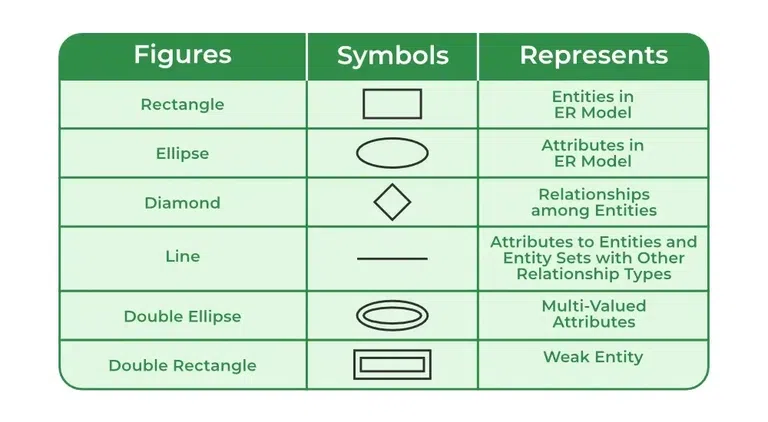
Symbols description of ER Diagram
Normalization
Normalization is the process to reduce redundancy and improves data integrity. Normal forms include:
- 1NF: Remove duplicate columns.
- 2NF: Remove partial dependencies.
- 3NF: Remove transitive dependencies.
Denormalization
Denormalization increases performance by combining tables but can introduce redundancy. Example: Instead of joining and mterialized views, you create a view with all the required data with minimum query.
Some Design Best Practices
- Use appropriate data types (like for unique identifiers).
- Normalize the data but denormalize if performance demands.
- Index important columns for faster lookup.
- Avoid NULLs where possible to reduce query complexity.
- Follow naming conventions (like snake_case for names).
- Use Proper Constraints (like Default, Not Null).
Data Types
PostgreSQL Data Types include:
Numeric Types:
- INTEGER / INT: Whole numbers (-2^31 to 2^31-1)
- BIGINT: Large integers (-2^63 to 2^63-1)
- SMALLINT: Small integers (-32,768 to 32,767)
- DECIMAL / NUMERIC: Exact precision numbers (e.g., money)
- REAL / DOUBLE PRECISION: Floating-point (approximate) numbers
Character (String) Types:
- CHAR(n): Fixed-length string (‘ABC ’ padded)
- VARCHAR(n): Variable-length string (up to n characters)
- TEXT: Unlimited-length string (for large text)
Boolean Type:
- BOOLEAN: True/False/NULL values
Date & Time Types:
- DATE: Date only (‘2024-12-14’)
- TIME: Time only (‘14:30:59’)
- TIMESTAMP: Date + Time (‘2024-12-14 14:30:59’)
- TIMESTAMPTZ: Timestamp with timezone (‘2024-12-14 14:30:59+00’)
- INTERVAL: Duration or time difference (‘2 days 5 hours’)
Geometric Types:
- POINT: Point in 2D space ((1, 2))
- LINE / LSEG: Line or line segment
- BOX / CIRCLE: Shapes like rectangles and circles
JSON & JSONB Types:
- JSON: Text-based JSON data (slower)
- JSONB: Binary-optimized JSON (faster)
Array Types:
- ARRAY: Array of any data type (e.g., {1, 2, 3})
UUID:
- UUID: Universally unique identifier (550e8400-e29b-41d4-a716-446655440000)
Special Types:
- SERIAL / BIGSERIAL: Auto-incrementing integer (for primary keys)
- INET / CIDR: IP address or network (192.168.0.1, 192.168.0.0/24)
- MACADDR: MAC address (08:00:2b:01:02:03)
Custom Types:
- ENUM: Custom set of values (e.g., ‘happy’, ‘sad’, ‘angry’)
- Composite Types: Custom data structures like records
- Range Types: Ranges of values (e.g., int4range, numrange)
Keys
- Primary Key (PK): Uniquely identifies a record.
- Foreign Key (FK): Links a table to another.
- Unique Key: Ensures values in a column are unique.
- Composite Key: Combines multiple columns to create a unique identifier.
Constraints
Constraints are rules or restrictions applied to columns or tables in a PostgreSQL database to ensure data integrity and consistency. They restrict what type of data can be stored in a tables columns.
Some well known constraints
- NOT NULL: Column must not be NULL.
- UNIQUE: No duplicates allowed.
- PRIMARY KEY: Unique identifier.
- FOREIGN KEY: Links to another table.
- CHECK: Custom validation rule.
- DEFAULT: Default column value.
- EXCLUSION: Prevents range overlap.
Create Database
Database is where your data will be store. To create a database:
| |
Create Database Schema
A schema in PostgreSQL serves as a logical container within a database, acting as a namespace for organizing database objects like tables, views, functions, data types, stored procedures, and other database objects. To create a schema:
| |
Table, Row (Tuple/Record), Column (Field/Attribute)
- A table is a collection of related data organized in rows and columns. It represents an entity in a relational database. Example: table that stores user information.
- A row represents a single record in the table. Each row holds data about one instance of the entity. Example: a user information say Bablu’s information is a row.
- A column defines a specific attribute for the entity and holds data of a single type for all rows. Example: name, id and others type itself is attribute or column.
To create a table with row and column:
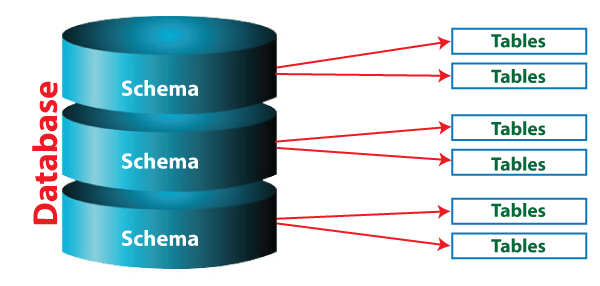
Logical representation of Database, Schema and Table
Basic PostgreSQL CRUD Operations
Inserting Data
Lets insert some data into the and tables.
Querying Data
Fetch all employees from the table.
| |
Updating Data
Suppose you want to update the salary of a employee.
Deleting Data
If you want to delete a employee, you can do the following:
| |
Joins
Joins combine data from multiple tables.
Types of Joins:
- INNER JOIN: Returns matching records.
- LEFT JOIN: Returns all from the left table, even if no match.
- RIGHT JOIN: Returns all from the right table.
- FULL JOIN: Returns all from both tables.
Example:
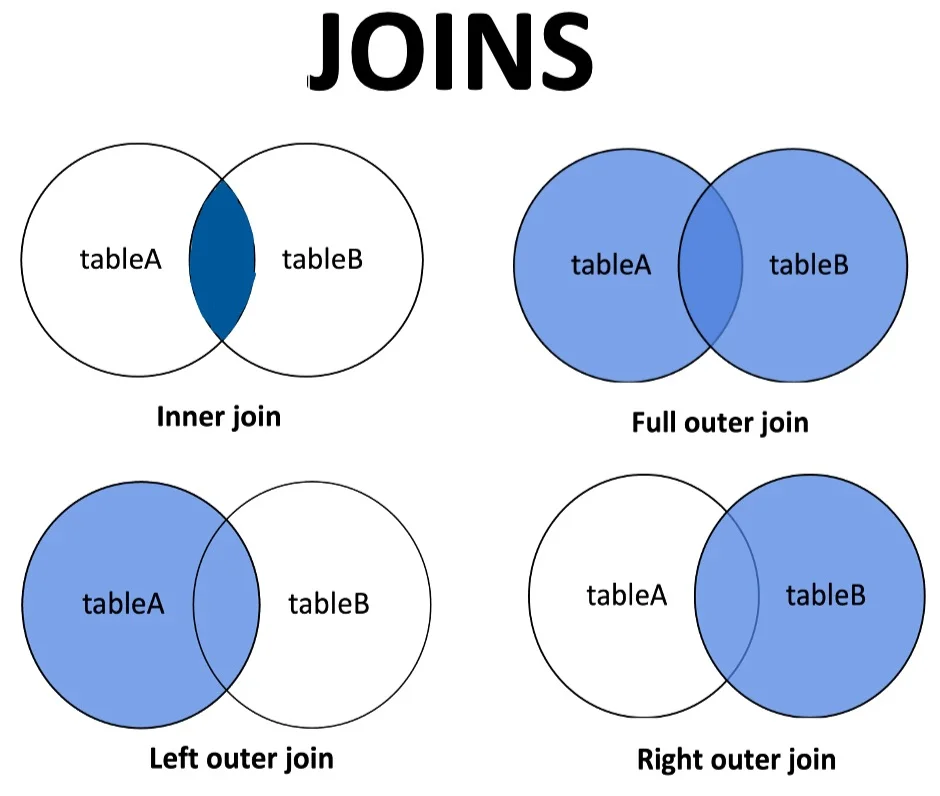
Joins Visualization
Aggregate Functions
Aggregate functions perform calculations on multiple rows. Like:
- COUNT(): Counts rows.
- SUM(): Sum of values.
- AVG(): Average value.
- MAX(): Maximum value.
- MIN(): Minimum value.
Example:
Grouping, Union, Intersection
- UNION: Combines multiple queries, Removes duplicates by default, Returns rows from both queries.
- INTERSECTION: Returns only common rows, Removes duplicates, Returns rows common to both queries.
- GROUPING: Groups rows with similar values, Returns aggregated summary of rows.
Example
Some Advanced SQLs
Recursive Queries (WITH RECURSIVE)
Used for hierarchical or tree-like data. The following query creates a hierarchy of numbers with recursive self-referencing.
Example: Number Hierarchy
Window Functions
Window functions compute values over a window of related rows. Like assigns a rank to each employee per salary.
Example: Rank Employee by Salary
Common Table Expressions (CTE)
CTEs improve query readability.
Example
Transactions
A transaction ensures ACID compliance.
Example
Triggers
Triggers run when a specific event occurs (like INSERT, UPDATE, DELETE).
Example: Log Changes
| |
JSON and JSONB
PostgreSQL supports JSON with efficient storage and querying of JSON data.
Example: JSON Query
Indexes
Indexes speed up queries by optimizing lookups.
Example
| |
Locks
Locks prevent conflicts when multiple users access the same data.
Example
Views
A PostgreSQL View is a virtual table that is based on the result of a SQL query. It does not store data physically but displays the result of a predefined SQL query whenever it is accessed. Views are useful for:
- Data Abstraction: Hide complex queries behind simple table-like objects.
- Security: Restrict access to certain rows or columns.
- Reusability: Avoid repeating complex joins or calculations.
Example
Summary:
So Relational Database organizes data into tables (like spreadsheets) with rows (records) and columns (attributes). Each table is linked to others using keys (like IDs) to avoid duplication and to ensure consistency it uses many Constraints. This system allows for easy data retrieval, updates, and queries. It’s efficient, scalable, and essential for managing structured data.