Other Parts of This Series:
- Part 6: DevOps - Step By Step Learning : Part 6 (Why, What and How Much Linux Knowledge Should Know)

DevOps Linux Kernel, Boot Process, File System (Photo Credit: Unsplash)
Story:
Now Rasel understood why Linux is important, why it is really needed, what he should learn, and how much Linux knowledge he should know to work in DevOps. It’s time to start with the core concepts, like the Linux core component called the Kernel, how it boots, and what the file structure is that Linux holds to manage everything.
What is the Linux Kernel?
The Linux Kernel is the core of the operating system that acts as a bridge between hardware and software. It manages system resources like CPU, memory, processes, devices, and networking.
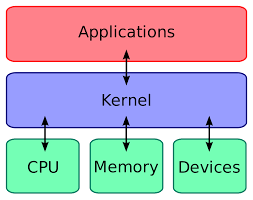
Linux Kernel (Photo Credit: Digilant)
🛠 Key Responsibilities of the Kernel
- Process Management: Handles running programs (processes).
- Memory Management: Allocates and manages RAM efficiently.
- Device Management: Interacts with hardware like disk, keyboard, and USB.
- File System Management: Controls how data is stored and retrieved.
- Networking: Manages communication between devices and servers.
Kernel Related Common Commands
✅ Real-World Example: If your WiFi is not working, you might need to reload the WiFi driver
What is Kernel Space?
Definition: Kernel space is a privileged area where the Linux kernel operates. It has full access to system resources (CPU, memory, devices) and manages system calls from user applications.
Characteristics of Kernel Space:
- Runs in ring 0 (highest privilege mode).
- Directly interacts with hardware components.
- Executes core system processes like memory management, scheduling, and device drivers.
- Only kernel-mode processes (like device drivers and system services) run here.
What is User Space?
Definition: User space is where user applications and programs run. Applications do not have direct hardware access—they communicate with the kernel using system calls.
Characteristics of User Space:
- Runs in ring 3 (lowest privilege mode).
- Contains all user applications, like text editors, browsers, and DevOps tools.
- Cannot access hardware directly—it must request resources via system calls (open, read, write).
- Crashing an application does not crash the system.
What is the Linux Boot Process?
The boot process is the series of steps the system follows from powering on to loading the operating system.
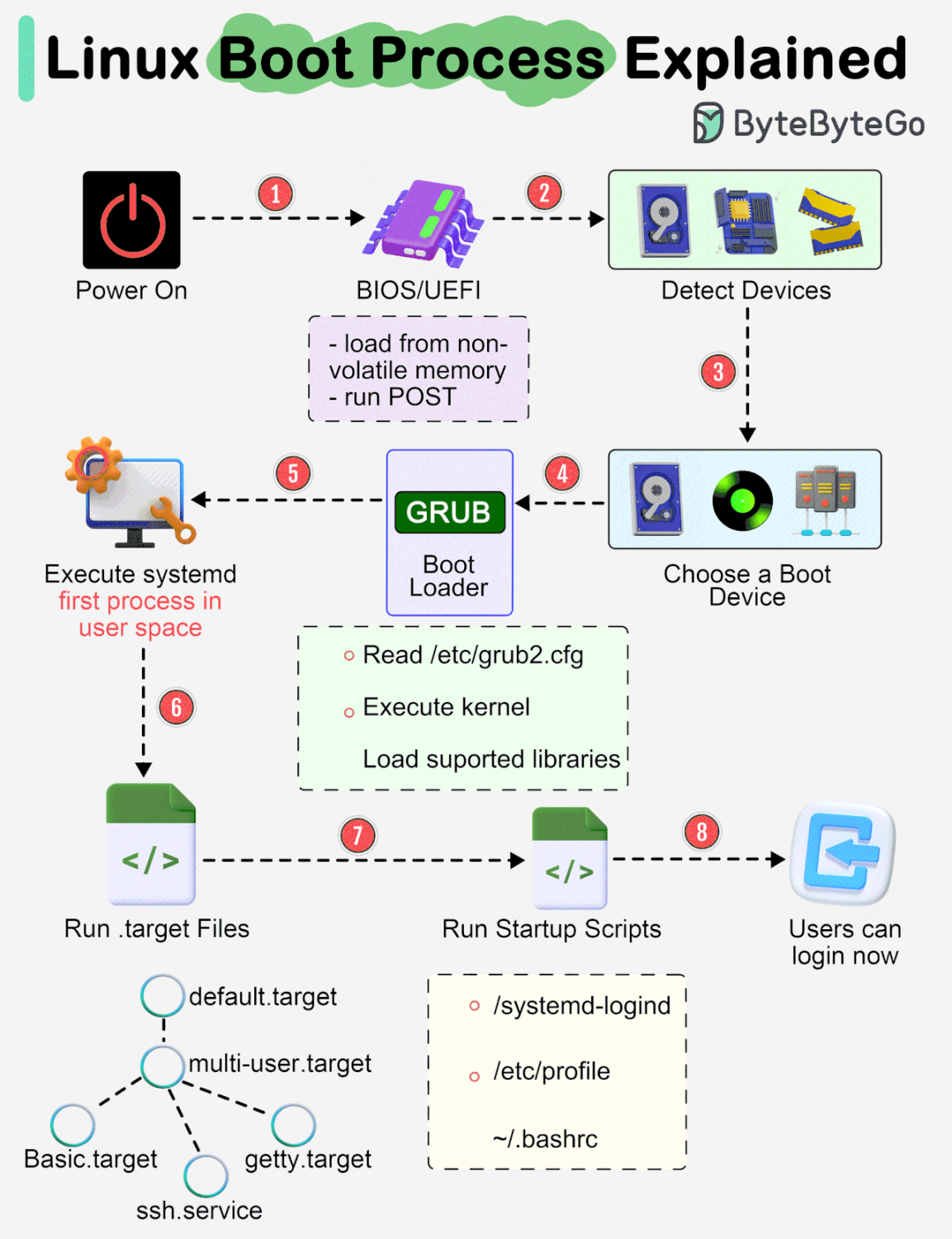
Linux Boot Process (Photo Credit: ByteByteGo)
🛠 Steps in the Linux Boot Process
1️⃣ BIOS/UEFI Initialization
- BIOS/UEFI initializes hardware (RAM, CPU, disk).
- It looks for a bootable device (HDD, SSD, USB).
2️⃣ Bootloader (GRUB or LILO) Execution
- The bootloader loads the Linux kernel into memory.
- GRUB (GRand Unified Bootloader) is the most common bootloader.
3️⃣ Kernel Initialization
- The kernel takes control and initializes hardware drivers.
- It mounts the root filesystem as read-only.
4️⃣ init or systemd Starts
- The system’s init system (SysVinit or systemd) runs background services.
- You can check the system manager using: “ps –pid 1”
5️⃣ Runlevel/Target Services Start
- The system loads services like networking, SSH, and display managers.
- You can check active services using: “systemctl list-units –type=service –state=running”
6️⃣ Login Prompt Appears
- The system reaches the login prompt (tty1 for CLI or graphical login).
- To see system boot logs: “journalctl -b”
What is the Linux Filesystem?
A filesystem is how Linux organizes and stores data on disk. Linux follows the Filesystem Hierarchy Standard (FHS), meaning files are arranged in a structured manner.
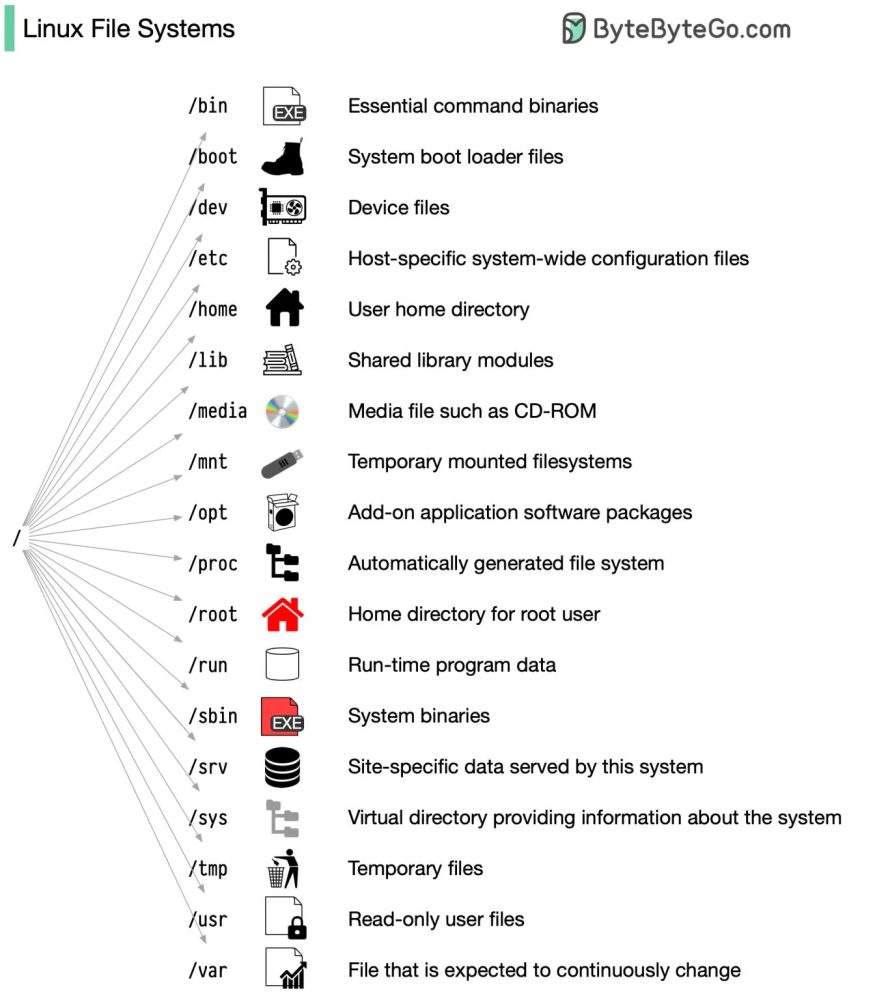
Linux File System (Photo Credit: ByteByteGo)
🛠 Linux Filesystem Structure
📂 / → Root Directory (Everything starts from here)
📂 /bin → Essential system binaries (ls, cp, rm, mkdir)
📂 /boot → Bootloader files (grub, vmlinuz)
📂 /dev → Device files (USB, hard drives, keyboard, etc.)
📂 /etc → Configuration files (/etc/passwd, /etc/ssh/sshd_config)
📂 /home → User home directories (/home/user)
📂 /lib → Shared libraries needed for system binaries
📂 /mnt → Mount point for additional storage (external disks)
📂 /opt → Optional software installed manually
📂 /proc → Kernel and process information (/proc/cpuinfo, /proc/meminfo)
📂 /root → Home directory of the root user
📂 /sbin → System administration binaries (shutdown, reboot, iptables)
📂 /tmp → Temporary files (deleted on reboot)
📂 /usr → User utilities and software (/usr/bin, /usr/local)
📂 /var → Variable data (logs, cache, mail, databases)
Summary:
- Linux Kernel: The core system managing hardware, memory, and processes.
- Linux Boot Process: Steps from power-on to login, managed by BIOS -> GRUB -> Kernel -> Systemd.
- Linux Filesystem: Organized directories for system configuration, logs, user data, and binaries.