Other Parts of This Series:
- Part 15: DevOps - Step By Step Learning : Part 15 (Learn Fundamental Networking Theoretical Knowledge)
DevOps Networking DNS & DHCP (Photo Credit: Unsplash)
Story:
Rasel learned the basic theoretical networking knowledge. He also understood how all the communication works by combining different important parts from the high level. But he was also curious to know the low level. First he wanted to start from the application layer (Layer 7 in OSI, Layer 4 in the TCP/IP model). He learned that the source and destination IP are resolved in the application layer and those used in other layers, like the session layer and so on. Now he was genuinely interested in how this source and destination IP resolving works behind the scenes in detail. Thus Rasel deep dives in exploring.
DNS - Domain Name System (Destination IP Resolving)
What Is DNS?
DNS (Domain Name System) acts like a phone book for the internet. It translates human-readable domain names (like google.com) into machine-readable IP addresses (like 142.250.183.206). So you can consider it as the mapping process between domain name to corresponding IP address.
- It allows users to navigate the web using memorable names (domain name) instead of complex numerical addresses (IP address).
- It works over UDP (port 53) most of the time (sometimes TCP).
- Operates at the Application Layer in the OSI/TCP-IP models.
How DNS Works? (Step-by-Step)
Example: You open your browser and go to www.github.com.
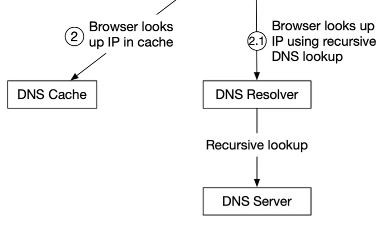
DNS-1 (Photo Credit: ByteByteGo)
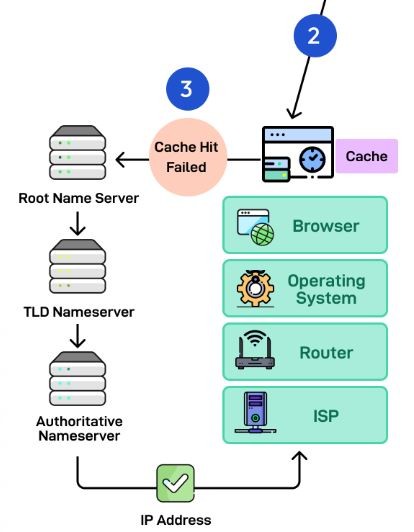
DNS-2 (Photo Credit: ByteByteGo)
- Your OS checks DNS cache
- Data is cached at different layers: browser cache, OS cache, local network cache, and ISP cache.
- If no cached entry exist, it moves on next steps.
- Query is sent to a local DNS resolver (like 8.8.8.8 or your ISP)
- This is done over UDP at the application layer.
- The resolver checks:
- If cached → returns result.
- If not cached → performs recursive lookup.
- Resolver asks:
- Root server → “Who knows .com?”
- .com TLD (Top Level Domain) server → “Who knows github.com?”
- Authoritative server for github.com → returns the A record (IP address).
DNS response is sent back to your machine with the desired IP address.
Your browser connects to the returned IP using HTTP/HTTPS.
Also cached the response with a TTL for fast future lookup.
Types of DNS Records
- A (used for IPv4 address).
- AAAA ( used for IPv6 address).
- CNAME (used for make Alias).
- MX (used for define Mail exchange).
- TXT (used for give Info e.g., SPF).
Real-Life DevOps Example
When deploying a web app on AWS:
- You map a domain to a Load Balancer IP using a CNAME or A record.
- Your internal services (Kubernetes) might use CoreDNS for service discovery:
| |
DHCP - Dynamic Host Control Protocol (Source IP Resolving)
What Is DHCP?
DHCP automatically assigns IP addresses and network configurations (like subnet, gateway, DNS) to devices when they join a network. It works by using a server to manage a pool of IP addresses and then dynamically assigning them to requesting devices, as needed, instead of assigning static IP manually.
- This process ensures that each device has a unique IP address for communication, and that the addresses can be reassigned when the device leaves the network.
- Operates at the Application Layer.
- Uses UDP Ports 67 (server) and 68 (client).
What DHCP Provides?
- IP Address.
- Subnet Mask.
- Default Gateway.
- DNS Server.
- Lease time (how long the IP is valid).
Components of DHCP
The main components of DHCP include:
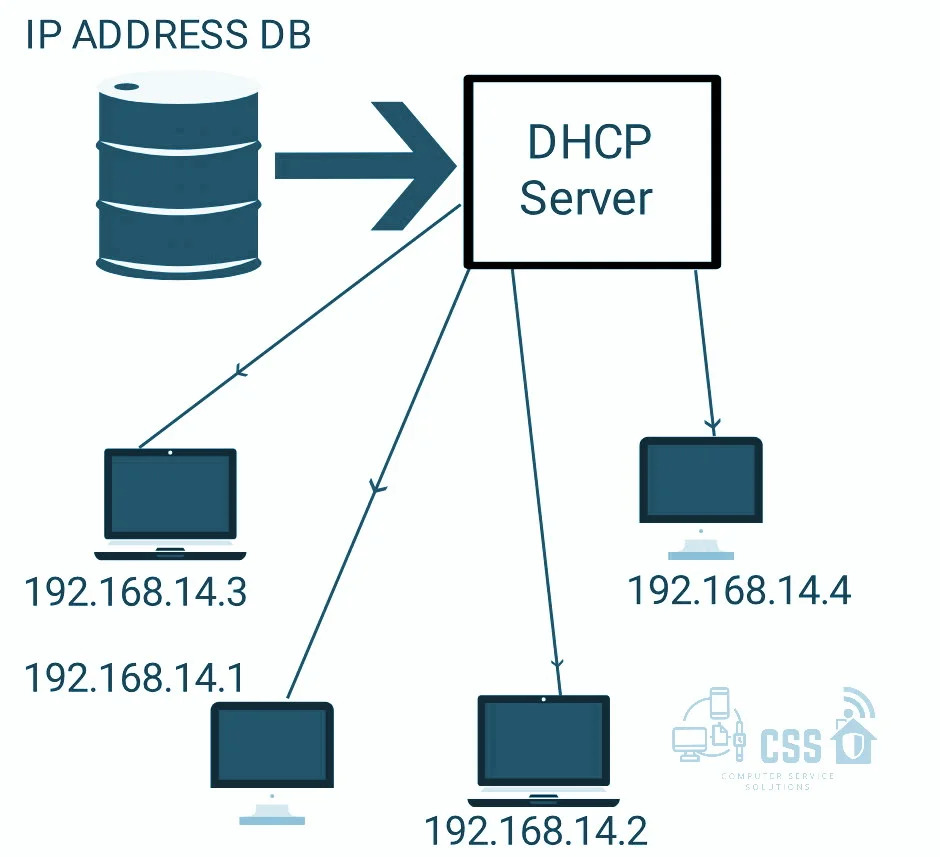
DHCP (Photo Credit: digibrandbox)
- DHCP Server: DHCP Server is a server that holds IP Addresses and other information related to configuration.
- DHCP Client: It is a device that receives configuration information from the server. It can be a mobile, laptop, computer, or any other electronic device that requires a connection.
- DHCP Relay: DHCP relays basically work as a communication channel between DHCP Client and Server.
- IP Address Pool: It is the pool or container of IP Addresses possessed by the DHCP Server. It has a range of addresses that can be allocated to devices.
- Subnets: Subnets are smaller portions of the IP network partitioned to keep networks under control.
- Lease: It is simply the time that how long the information received from the server is valid, in case of expiration of the lease, the tenant must have to re-assign the lease.
- DNS Servers: DHCP servers can also provide DNS (Domain Name System) server information to DHCP clients, allowing them to resolve domain names to IP addresses.
- Default Gateway: DHCP servers can also provide information about the default gateway, which is the device that packets are sent to when the destination is outside the local network.
- Options: DHCP servers can provide additional configuration options to clients, such as the subnet mask, domain name, and time server information.
- Renewal: DHCP clients can request to renew their lease before it expires to ensure that they continue to have a valid IP address and configuration information.
- Failover: DHCP servers can be configured for failover, where two servers work together to provide redundancy and ensure that clients can always obtain an IP address and configuration information, even if one server goes down.
- Dynamic Updates: DHCP servers can also be configured to dynamically update DNS records with the IP address of DHCP clients, allowing for easier management of network resources.
- Audit Logging: DHCP servers can keep audit logs of all DHCP transactions, providing administrators with visibility into which devices are using which IP addresses and when leases are being assigned or renewed.
How DHCP Works? (DORA Process)
Example: You connect your laptop to Wi-Fi at a coffee shop.
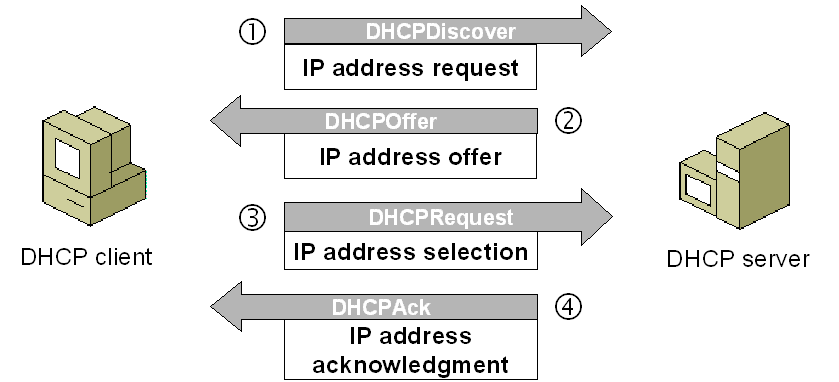
DHCP (Photo Credit: computernetworkingnotes)
- DHCP Client Request: DHCP Discover
- When a device joins a network that uses DHCP, it sends a broadcast message to the network to request an IP address.
- DHCP Server Response: DHCP Offer
- The DHCP server receives the request and offers an available IP address from its pool.
- DHCP Client Accepts Offer: DHCP Request and Acknowledge
- The client accepts the offered IP address and other network configuration parameters (like subnet mask, default gateway, and DNS server).
- IP Address Lease:
- The IP address is leased to the client for a specified period of time.
- IP Address Reassignment:
- When the lease expires or the client leaves the network, the IP address is returned to the DHCP server’s pool for reassignment to other devices.
Real-Life DevOps Example
You launch an EC2 instance:
- The VPC’s DHCP options set gives the instance its private IP, DNS, and gateway.
- In a local lab setup, your VMs may rely on dnsmasq or ISC DHCP server to get network settings.
Summary:
- DNS helps your app find other services means destination IPs using names.
- DHCP gives your app or VM an IP address which is source IP and tells it how to reach the internet.
- Both work at the application layer, sending and receiving structured messages using UDP.