Other Parts of This Series:
- Part 16: DevOps - Step By Step Learning : Part 16 (How DNS and DHCP Operates in Application Layer)
- Part 18: DevOps - Step By Step Learning : Part 18 (NAT, PAT For Inner Private with Outer Public Network Handshaking)

DevOps Networking ARP (Photo Credit: Unsplash)
Story:
After exploring the source and destination IP resolution process in application layer using DNS and DHCP, Rasel now wanted to explore in low level how this IP is actively used in other layers. He observed that an IP address is the logical addressing scheme for nodes on a network. IP addresses exist at the Network layer of the OSI Model and help facilitate the L3 goal of “end to end” delivery. On the other hand, a MAC address is the physical addressing scheme for individual NIC cards on each node of a network. MAC addresses exist at the Data Link layer of the OSI Model and help facilitate the L2 goal of “hop to hop” delivery. But in this point, Rasel was every curious to know the depth process how this 2 logical and physical addressing correlate with each other.
ARP (Address Resolution Protocol)
What Is ARP?
ARP (Address Resolution Protocol) is a protocol used to that maps IP addresses (logical addresses used for communication) to MAC addresses (physical addresses used for data transfer on the network) within a local network (like LAN). Think of it as a directory that tells devices on a network how to find each other using their physical addresses, even though they communicate using IP addresses.
- ARP is used to discover the MAC address of a device when only the IP address is known.
- It works at Layer 2 (Data Link Layer) but supports Layer 3 (Network Layer) functionality.
- It’s essential for IPv4 (not used in IPv6, which uses NDP instead).
Why Do We Need ARP?
Problem:
- A device (say your laptop) wants to send data to 10.1.1.1, but Ethernet requires the MAC address, not the IP.
Solution:
- Use ARP to ask: “Who has IP 10.1.1.1? Tell me your MAC address!”.
- The target device replies with its MAC address. Then your laptop sends the Ethernet frame to that MAC.
How ARP Works (Step-by-Step)?
Let’s say your PC (10.1.1.1, MAC AAA) wants to ping 10.1.1.3.
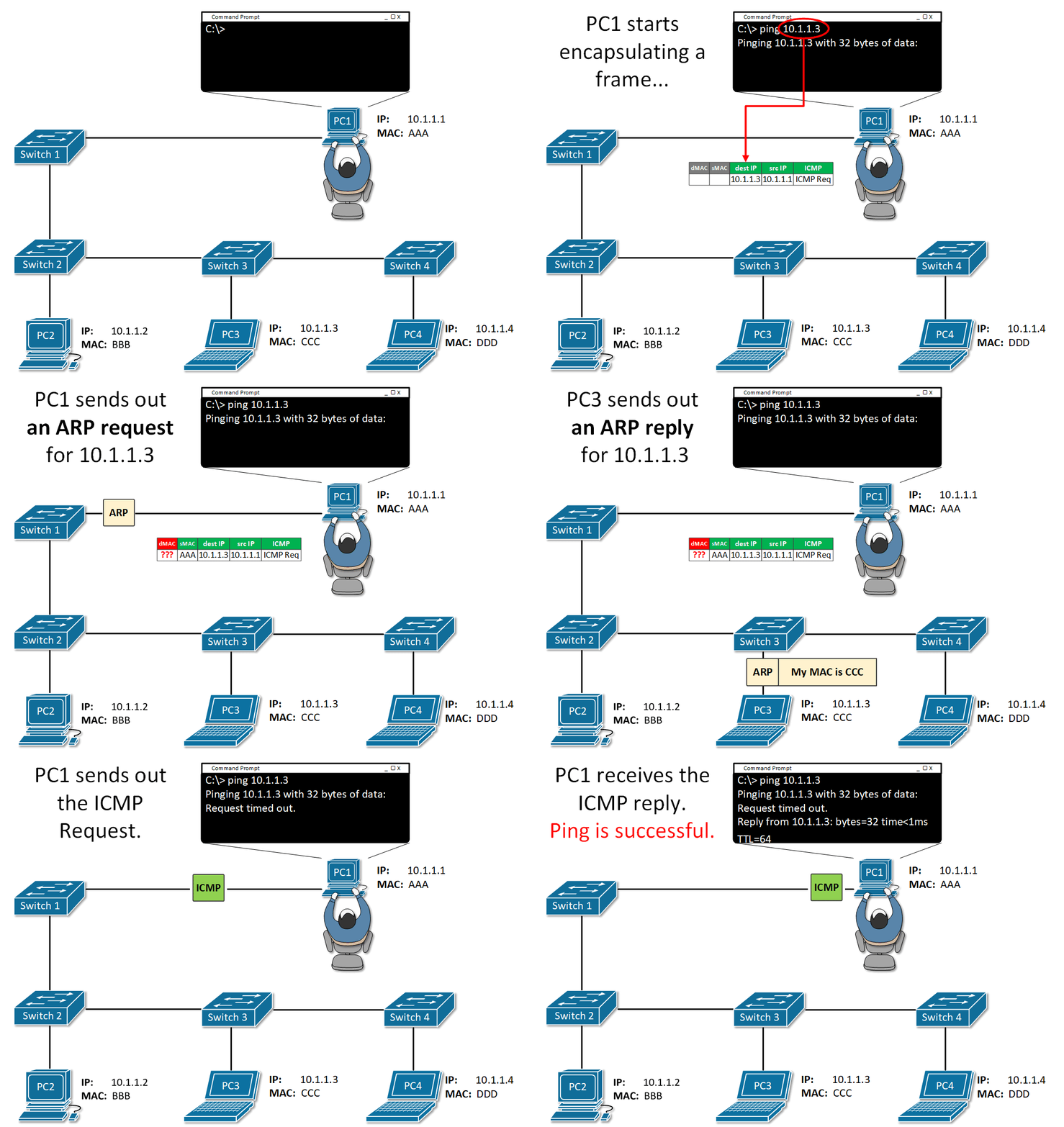
ARP (Photo Credit: NetworkAcademy.io)
Check ARP Cache
- If the IP is already mapped to a MAC, use that.
Send ARP Request (Broadcast)
- “Who has 10.1.1.3? Tell 10.1.1.1”.
- Sent to MAC FF:FF:FF:FF:FF:FF (broadcast).
Receive ARP Reply (Unicast)
- 10.1.1.3 is at CCC.
- The reply is saved in the ARP table (cached temporarily).
Real-Life Analogy
Imagine you’re in an office and want to send a file to John, but only know his desk number (IP address).
- You ask out loud: “Who sits at desk 192.168.1.5?”
- John replies: “That’s me! I’m MAC address DD:EE:FF!”.
- And finally, now you send the file directly to him.
Types of ARP
- Traditional ARP: Used for direct communication on local networks.
- Normal Request-Reply model.
- Found in all ARP-capable systems (Linux, Windows, routers, etc.).
- Proxy ARP: A router responds to ARP requests on behalf of another device.
- Use case: Devices on different subnets but physically connected.
- The router “pretends” to be the target host.
Example:
- Host A (192.168.1.10) and Host B (192.168.2.10) are on different subnets.
- Router R connects both subnets.
- A sends ARP request for B.
- R replies with its own MAC → routes traffic for B.
- Gratuitous ARP: An unsolicited ARP reply broadcasted without a request.
- “Hey, I’m 192.168.1.10 and my MAC is AA:BB:CC:11:22:33.”
- Used for: IP conflict detection, Updating stale ARP caches in other devices, Informing switches of MAC changes.
- ARP Probe: Used to check if an IP address is already in use.
- Part of ZeroConf / DHCP process.
- Sent with source IP = 0.0.0.0
- Device says: “Is anyone using 192.168.1.50?”
- If no one responds, it assumes it can use it.
- ARP Announcement: Used to announce a new IP-MAC binding.
- Sent by a device to claim an IP.
- Often follows a probe.
- Helps switches learn MAC mappings and avoid misrouting.
Further Readings:
Summary:
ARP is essential for communication between devices on a local area network (LAN). Without it, devices wouldn’t be able to find each other on the network and send data. But security attacks like ARP poisoning, where attackers can intercept or manipulate network traffic by spoofing MAC addresses is possible. So need to be aware of this security concern also.