Other Parts of This Series:
- Part 18: DevOps - Step By Step Learning : Part 18 (NAT, PAT For Inner Private with Outer Public Network Handshaking)
- Part 20: DevOps - Step By Step Learning : Part 20 (Hands On Networking Commands, Practically Connect The Theory)

DevOps Networking TCP & UDP (Photo Credit: Unsplash)
Story:
Till now Rasel explored how data move host to host over the OSI or TCP/IP model by utilizing all the parties/parts like networking devices and protocols. He understood how source and destination IPs resolved in the application layer using DHCP and DNS, respectively. Also, he tried to realize how the logical address, like IP, makes a connection with the physical address, like the MAC address, using ARP the bridge between the data link and network layers. Besides all of these, Rasel explored how do using mechanisms like NAT/PAT overcome IPv4 limitations and private-public IP mapping in the transport and network layers. All the points were served via MAC address table, routing table, ARP table/cache, NAT mapping table, etc.
Then Rasel wanted to explore the 2 most used and important protocols of Layer 4 (transport layer) called TCP (transmission control protocol) and UDP (user datagram protocol). Their main job is to deliver data between applications (service to service) running on different devices across a network.
TCP (Transmission Control Protocol)
What is TCP?
TCP (Transmission Control Protocol) is a connection-oriented, reliable transport layer protocol (Layer 4 in the OSI model) that ensures complete, sure, ordered and accurate data delivery between devices over a network.
Why Do We Need TCP?
We need TCP when:
- Data must arrive intact, in order, and without duplication.
- You’re dealing with critical data (e.g., files, login credentials, HTML pages).
Real-life Examples:
- Web Browsing (HTTP/HTTPS)
- Remote login (SSH)
- File Transfers (FTP, SFTP)
- Email (SMTP, IMAP)
Key Features of TCP
- Reliable Transmission: Guarantees packet delivery and correct sequence.
- Connection-Oriented: Requires handshake before data transmission.
- Error Checking: Uses checksums to detect errors.
- Ordered Delivery: Reorders packets if they arrive out of sequence.
- Flow Control: Prevents overwhelming the receiver.
- Congestion Control: Manages traffic on congested networks.
- Full Duplex: Data can be sent and received simultaneously.
How TCP Works (Step by Step)?
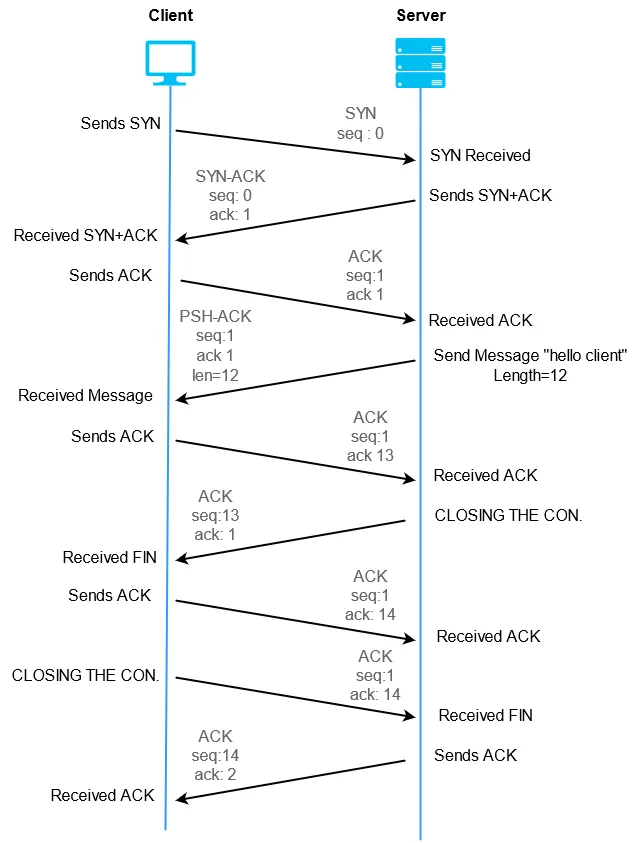
TCP Handshaking (Photo Credit: Medium)
Connection Establishment: 3-Way Handshake:
- SYN: Client to Server (Client Request connection)
- SYN+ACK: Server to Client (Server Acknowledge request and Request Connection)
- ACK: Client to Server (Client also Acknowledge and Confirm connection)
Data Transmission:
- Data sent in segments.
- Each segment has a sequence number.
- Receiver sends ACK for each received segment.
- If ACK not received, retransmit.
Connection Termination (4-Step):
- FIN + ACK: Client to Server (Client Request connection finish and Acknowledge)
- FIN + ACK: Server to Client (Server Request connection finish and Acknowledge)
Advantages and Disadvantages of TCP
Advantages:
- Reliable delivery
- Ensures order
- Built-in error recovery
- Congestion and flow control
Disadvantages:
- Slower (due to acknowledgments and retransmissions)
- More overhead (20+ byte header)
- Not ideal for real-time apps
- Requires connection setup
TCP Header & Important Parts
Minimum size: 20 bytes, max ~60 bytes
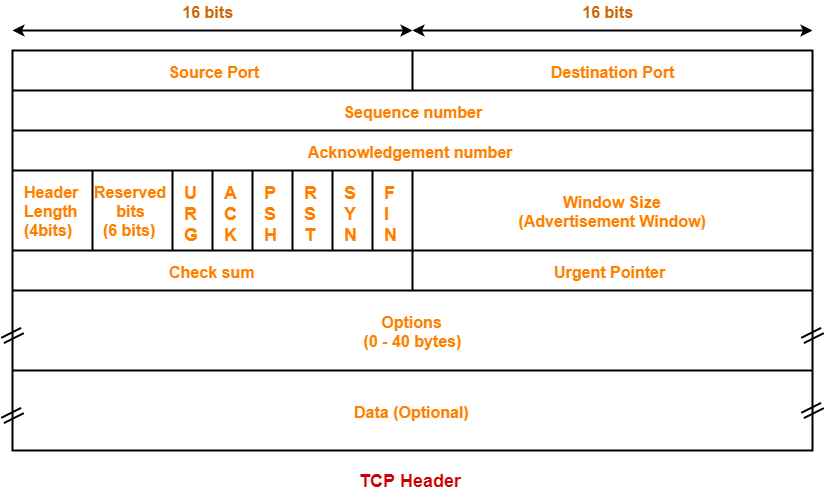
TCP Header (Photo Credit: Gate Bidyalay)
Key Fields:
- Source Port / Destination Port: Identify sending/receiving apps
- Sequence Number: Order of bytes sent
- Acknowledgment Number: Confirm which bytes were received
- Flags: Control bits (e.g., SYN, ACK, FIN, RST, PSH)
- Window Size: Flow control info
- Checksum: Error checking
- Options: For extensions (e.g., window scaling, SACK)
Flow Control & Congestion Control
Flow Control (Receiver-side protection):
- Prevents sender from overwhelming receiver.
- Uses Sliding Window to Receiver advertises how much data it can handle.
Example: Receiver: “I can take 5000 bytes” so Sender won’t send more until window slides forward (i.e., data acknowledged).
Congestion Control (Network protection):
- Prevents network overload.
- Uses algorithms like: Slow Start (Starts with small window, increases exponentially), AIMD (Additive Increase, Multiplicative Decrease), Fast Retransmit/Recovery (Quickly recover from packet loss without full reset)
Example: Too much traffic then packet drops and TCP slows down.
UDP (User Datagram Protocol)
What is UDP?
UDP (User Datagram Protocol) is a connectionless, unreliable, fire and forget, fast transport layer protocol. It’s best when speed matters more than reliability.
Why Do We Need UDP?
We need UDP when:
- Data send need to be faster.
- You’re dealing with real-time data (e.g., DNS, voice call, video stream).
Real-life Examples:
- DNS
- Video calls (Zoom, Skype)
- Online gaming
- Streaming (YouTube, Netflix)
- Syslog (logs over UDP)
Key Features of UDP
- Fast and Lightweight: No connection setup
- No Reliability: No acknowledgments, no retransmits
- No Flow/Congestion Control: Sender sends at will
- Fixed Small Header (8 bytes): Efficient transmission
- Supports Multicast/Broadcast: Send to multiple devices
How UDP Works?
- Sends packets (datagrams) without establishing a connection.
- Each packet is independent.
- Receiver may get them: Out of order, Lost completely, Duplicated
No feedback or retries.
Advantages and Disadvantages of UDP
Advantages:
- Low latency
- Low overhead
- Good for real-time apps
- Supports multicast
Disadvantages:
- No delivery guarantee
- No retransmission
- No ordering
- Poor error handling
UDP Header & Important Parts
Only 8 bytes!
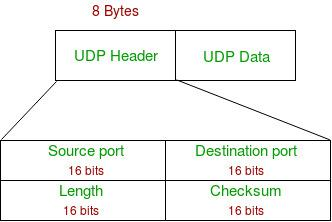
UDP Header (Photo Credit: Geeks for Geeks)
Key fields:
- Source/Destination Port: Identify apps
- Length: Total size (header + data)
- Checksum: Optional integrity check
Motivation is: Minimal fields is equal to faster processing.
Difference Between TCP and UDP
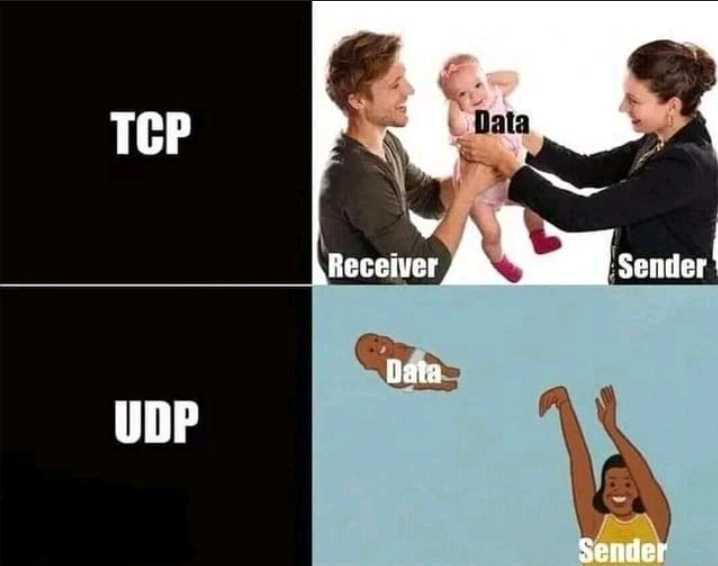
TCP vs UDP (Photo Credit: Google)
- TCP need 3 way handshaking, UDP not
- TCP ensure guaranteed packet transmission, UDP not
- TCP maintains order, UDP not
- TCP is slower than UDP
- TCP header size is much bigger than UDP
- TCP has flow and congestion control, UDP not
- For critical data application TCP is better than UDP
When to Use Which?
Use TCP when:
- Data must be correct, complete, and ordered
- Minor delay is acceptable
Examples:
- SSH (secure shell)
- HTTPS/HTTP
- FTP/SFTP
- Email (SMTP, IMAP)
Use UDP when:
- Speed and low latency > reliability
- Some data loss is tolerable
Examples:
- DNS
- Video calls (Zoom, Skype)
- Online gaming
- Streaming (YouTube, Netflix)
- Syslog (logs over UDP)
Summary:
TCP (Transmission Control Protocol) is like sending a letter through registered mail. It makes sure your data reaches the other side correctly, completely, and in the right order. It first sets up a connection between two devices, and once that’s done, it carefully tracks the data sent, confirms receipt with acknowledgments, and retransmits if anything is lost. This makes TCP reliable but a bit slower because of all the checks and confirmations. It’s best for applications like web browsing, file transfers, and emails where data accuracy is very important.
UDP (User Datagram Protocol), on the other hand, is like dropping a message in a bottle -there’s no guarantee it will arrive, but it’s fast and simple. It doesn’t establish a connection or wait for acknowledgments, so it uses fewer resources and sends data quickly. Because of this, UDP is great for time-sensitive activities like video calls, online gaming, or live streaming, where a few lost packets are better than a delay.