Other Parts of This Series:
- Part 24: DevOps - Step By Step Learning : Part 24 (Docker Compose & Docker Swarm Hands On)
- Part 26: DevOps - Step By Step Learning : Part 26 (Build Tools and Its Necessity)
DevOps Docker Networking (Photo Credit: Unsplash)
Story:
Rasel learned the fundamentals of native Docker, Docker Compose, and Docker Swarm. And by doing so, he solved the consistency and ‘it works on my machine’ issues in his daily development life.
Previously, Rasel investigated virtual machines (VMs), which operate using both host and guest operating systems and a hypervisor. However, he discovered that Docker does not require any additional guest OS and instead relies solely on the host OS. He was curious and wanted to know how things worked behind the scenes at a low level. So he attempted to bisect the Docker low level.
Docker Low Level Design
Docker LLD (Photo Credit: Google)
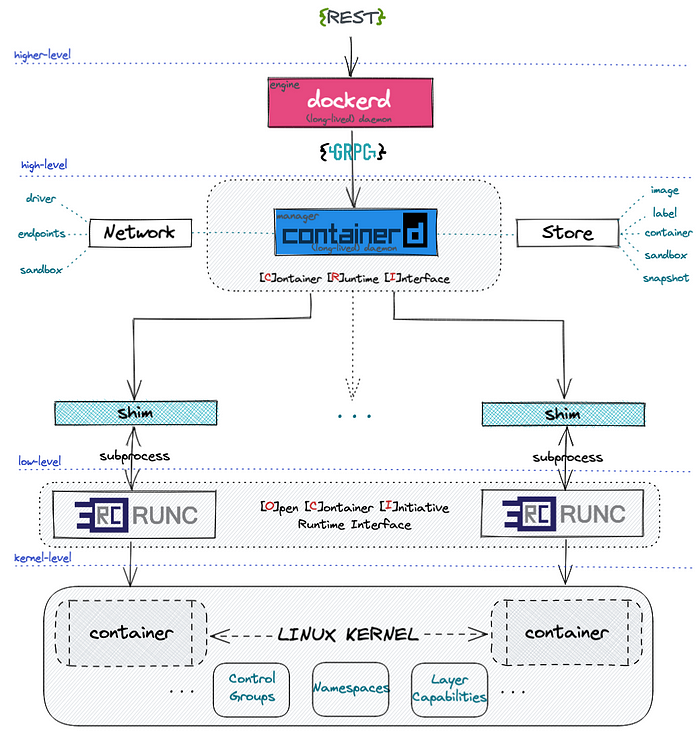
From the high level design, we saw that docker follows a client-server model. Means docker CLI or client talks with docker daemon via REST API. But in low level docker has the following building blocks:
1. Namespaces (Isolation):
Namespaces isolate different parts of the operating system for each container. Think of them as invisible walls around a process.
- pid: Isolates process IDs (so containers see only their own processes).
- net: Isolates networking interfaces (each container has its own network stack).
- mnt: Isolates the file system mount points.
- uts: Isolates hostname and domain name.
- ipc: Isolates shared memory and semaphores.
- user: Isolates user and group IDs.
| |
When you run a Docker container, Docker wraps the process in all these namespaces, so it looks like a mini-computer.
2. Cgroups (Control Groups) (Resource Limiting):
Cgroups limit how much CPU, memory, I/O, and other resources a container can use.
- Example: –memory=512m, –cpus=1.0
- Docker creates cgroups dynamically when you run a container.
You can inspect cgroups here:
| |
3. Union File Systems (OverlayFS):
Docker images are built in layers using copy-on-write file systems.
- Read-only layers for base images.
- Writable layer on top for container changes.
- Docker uses OverlayFS to combine layers.
4. Container Runtime (runc):
Docker uses a lower-level runtime like runc to create and manage containers. runc is what actually applies the namespaces and cgroups.
5. Containerd:
A lightweight container runtime that manages container lifecycle (start/stop, pause, snapshot, etc.). Docker uses containerd under the hood.
Docker Networking
Docker provides multiple networking modes using Linux bridge, veth pairs, and network namespaces. Likes:
1. bridge (default)
- Docker creates a virtual bridge called docker0.
- Each container gets a virtual Ethernet interface (veth) pair.
- One end in the container, the other in the bridge.
- IP assigned by Docker’s internal DHCP.
2. host
- Container shares the host’s network stack.
- No network isolation (great for performance or binding to host ports).
| |
3. none
- No network at all (completely isolated).
| |
4. overlay (Swarm)
- Used for multi-host networking in Docker Swarm.
- Requires a key-value store (like Raft, built into Swarm).
5. macvlan
- Assigns a real MAC address to the container.
- Container appears as a real device on the network.
6. ipvlan
- Similar to macvlan, but containers share the host’s MAC address while each still gets its own IP.
- Ideal when you want IP-level isolation without MAC overhead
How Docker Sets It Up (Bridge Networking Flow)
- Docker creates docker0 bridge on the host.
- When you run a container, it creates a veth pair.
- One end goes into the container’s net namespace.
- The other end connects to docker0 on the host.
- Docker assigns an IP to the container and adds appropriate iptables NAT rules.
Example: Visualizing Docker Networking
DNS & Service Discovery
Docker automatically runs a DNS server inside the bridge network:
- Containers can resolve each other by name (e.g., ping db)
- Uses /etc/hosts and embedded DNS (127.0.0.11)
Further Readings:
- https://medium.com/@furkan.turkal/how-does-docker-actually-work-the-hard-way-a-technical-deep-diving-c5b8ea2f0422 (Highly Recommended)
- https://man7.org/linux/man-pages/man7/namespaces.7.html
- https://www.youtube.com/watch?v=RqTEHSBrYFw&t=1827s
- https://www.youtube.com/watch?v=bKFMS5C4CG0 (Very Interesting)
- https://abdelouahabmbarki.com/linux-namespaces-network-ns/
- https://yuminlee2.medium.com/linux-networking-network-namespaces-cb6b00ad6ba4
Summary:
Docker’s low-level design is built on powerful Linux kernel features like namespaces, union filesystem, and control groups (cgroups). Namespaces isolate each container’s resources (like filesystem, network, PID, and users), making them feel like separate mini-systems, while cgroups control and limit resource usage (CPU, memory, etc.). This allows containers to run securely and efficiently on the same host.
On the networking side, Docker provides multiple built-in network drivers like bridge, host, none, overlay, macvlan, and ipvlan, each serving different use cases. For example, bridge is default and great for local development, overlay enables multi-host communication for Swarm, and macvlan/ipvlan allow containers to connect directly to the physical network with their own IPs. These networks are managed through Linux networking primitives like virtual Ethernet pairs, network bridges, and routing rules. Together, Docker’s LLD and networking capabilities provide fine-grained control and flexibility, enabling you to isolate, scale, and connect containers in powerful ways - all while staying lightweight and performant.