Other Parts of This Series:
- Part 13: Tale of Software Architect(ure): Part 13 (Clean Architecture)
- Part 15: Tale of Software Architect(ure): Part 15 (Backend for Frontend (BFF) Architecture Pattern)

Modular Monolith Architecture (Photo Credit: LinkedIn Image)
In this series, we try to explore the software architecture in a nutshell. We will try to learn the different aspects of software architecture and software architects one by one. In this part, we try to explore the modular monolith architecture pattern.
So let’s get started…
Story
In a bustling factory, everything was built together under one gigantic roof and at first, this setup was simple, everyone worked together in one big building, and they could quickly walk from one section to another if they needed help.
But as the factory grew, problems started to appear. The workers from others department often made mistake and slow down each other.
Then factory owner, Mr. Modular, had an idea: “Why don’t we keep everything under one roof, but organize the departments into separate sections?”
He built dividers between the departments. Each department would handle its own materials, tools, and products. However, they were still part of the same factory, so they could quickly help each other when needed.
This new system worked beautifully. The workers in each department became specialists, focusing only on their part of the production, and they stopped interfering with each other’s work. When the one department needed to make changes, it didn’t impact the other departments. The factory was still one big building, and everything was still produced and shipped together, but now, each team worked independently and efficiently within its own area.
Modular Monolith Architecture Pattern:
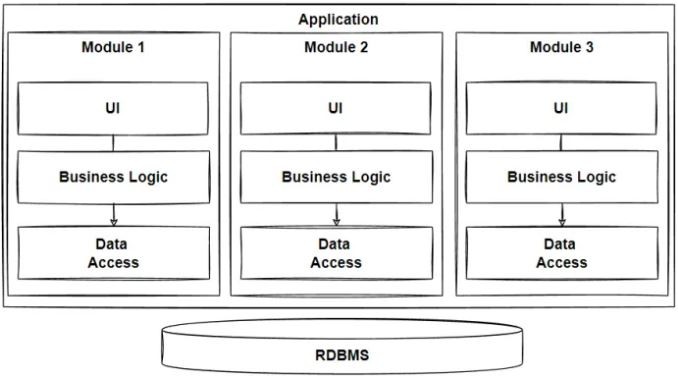
Modular Monolith Architecture (Photo Credit: Medium)
Modular Monolith is an architectural style that organizes an application into distinct, cohesive modules (often called “subsystems” or “components”), while still maintaining the simplicity and deployment characteristics of a traditional monolithic application. Unlike microservices, where each service runs independently, a modular monolith runs as a single unit but enforces strict module boundaries internally.
Key Characteristics:
- Single Deployment Unit: The entire application, despite being organized into multiple modules, is deployed as a single executable or package.
- Separation of Concerns / Clear Boundaries: Each module is responsible for a specific business function and has a clear boundary. This promotes cohesion within the module and loose coupling between modules.
- Internal Module Communication: Modules communicate with each other internally through method calls or APIs, but there are strict boundaries (enforced by the architecture) to prevent tight coupling or “spaghetti code.”
- Scalability: While it doesn’t scale independently like microservices, the modular design allows specific parts of the application to be optimized or replaced without affecting the entire system.
- Easier Refactoring: The modular structure makes it easier to refactor code within modules or even extract them into microservices when the need arises.
Practical Example: E-commerce Platform
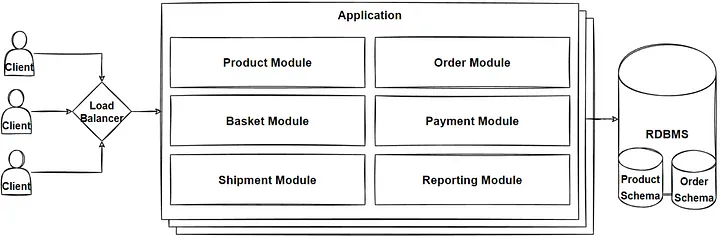
Modular Monolith Architecture (Photo Credit: GFG)
Imagine you’re building an e-commerce platform with different business functionalities, such as:
- Product Management (catalog, categories, pricing)
- Order Management (cart, orders, payments)
- User Management (authentication, profiles, roles)
- Shipping (delivery, tracking)
In a Modular Monolith:
- Each of these features is built as a separate module.
- You ensure that Product Management does not directly access the code or data of the Order Management module (i.e., encapsulation is enforced).
- When a user places an order, the Order Management module might call the Product Management module to fetch product details, but this is done through a well-defined API within the monolith.
Example in Code Structure (Java/Spring Boot):
- Modules are organized in packages like: com.ecommerce.product, com.ecommerce.order, com.ecommerce.user, com.ecommerce.shipping
- Each package has its own data layer, service layer, and controller. Communication between modules happens through service interfaces or APIs. For example, OrderService will use a method from ProductService to validate a product’s availability.
Context:
The Modular Monolith architecture pattern is ideal for medium-to-large applications that require organization into logical modules but don’t yet have the complexity, scale, or organizational structure to fully embrace microservices. It’s often chosen in scenarios where:
- Team Size: Development teams are small or medium, and coordination across independent services (as in microservices) might be too costly or unnecessary.
- Development Speed: There’s a need for faster development cycles without the overhead of managing multiple services.
- Deployment Simplicity: The team wants to deploy a single unit to simplify operations, testing, and version management.
- Future Growth: The system may not need microservices from day one but could evolve towards that, so it is designed to accommodate future migration.
Example Context: An e-commerce platform is being developed with features like product management, order processing, and user authentication. Initially, the traffic is moderate, and independent scaling of features is not yet a priority. The team wants to keep the deployment simple but still organized and flexible for future growth.
Problem:
Monolithic applications can become difficult to maintain, scale, and extend as they grow, because all functionalities are tightly coupled. This leads to:
- Tight Coupling: Changes in one part of the system may unexpectedly affect other parts.
- Spaghetti Code: Over time, code interdependencies increase, leading to a loss of clear boundaries between different business functions.
- Slow Development: Adding or modifying features becomes slow as the entire system must be redeployed, and testing becomes harder with more regression risks.
- Difficult Refactoring: Extracting a single business function for optimization or replacement can become a significant challenge.
The challenge is to maintain a monolithic deployment model while avoiding the drawbacks of traditional monoliths, such as poor modularity, inflexible scaling, and a tightly-coupled codebase.
Solution:
The Modular Monolith pattern solves these problems by introducing modularity within the monolith. Each business functionality is encapsulated into independent modules with clear boundaries and well-defined interfaces, reducing coupling and making the application easier to maintain and extend. However, the application is still deployed as a single unit, avoiding the complexity of managing multiple services (as in microservices).
Steps in the Solution:
- Separation of Concerns: Split the application into logical modules (e.g., product, order, user) where each module is responsible for its own business logic and data. These modules are self-contained, having their own repositories, services, and controllers.
- Enforce Boundaries: Use techniques to ensure that the internal details of a module (e.g., data models) aren’t directly accessed by other modules. Modules interact only through well-defined interfaces or APIs, maintaining loose coupling.
- Shared Deployment: The application is still deployed as a single artifact (e.g., a single .jar file in Java or a single deployment in a container), but with clear internal structure and separation of modules.
- Flexible Refactoring: As each module is self-contained, it can be refactored independently without affecting other modules. This makes the system more resilient to changes and future growth.
- Scalability: While it doesn’t allow independent scaling of modules, it provides an easier path to future refactoring into microservices if needed. Modules that experience heavy load can be extracted later and turned into standalone services.
Sample Pseudocode:
Consider an e-commerce platform with three modules: Product Management, Order Management, and User Management. Each module is logically separated but still part of a single monolith. They communicate with each other using well-defined interfaces.
Module-1: Product Management
This module handles product-related functionality, like adding or retrieving product information.
| |
Module-2: Order Management
This module handles order processing. It needs to fetch product details to verify the product before placing the order.
| |
Module-3: User Management
This module handles user-related operations like authentication and managing user details.
| |
Controller: Order Placement Endpoint
In the modular monolith, a controller handles incoming requests and coordinates between different modules.
| |
Summary:
Modular Monolith Architecture is a software design pattern where an application is organized into distinct, independent modules with clear boundaries but is still deployed as a single unit (monolith). Each module is responsible for a specific business function and communicates with other modules through well-defined interfaces.
When the team is small, and the project doesn’t need to scale at the level of microservices. When maintaining simple deployments is important. When transitioning to microservices in the future is a possibility but not needed immediately. Then this architecture can be a good choice.
This architecture is a middle ground between a traditional monolith and microservices, offering the best of both worlds in terms of simplicity and modularity.